 Ravi Kumar
Speed is the single most important thing about your website. Not the design. Not the copy. Speed.
Nobody reads your headline if the page is still white. Nobody fills your form if the button hasn't loaded. Nobody comes back to a website that made them wait. Every other thing you did right — the photos, the offer, the SEO — only counts after the page has painted.
Google ranks faster pages higher. Visitors trust them more. They buy from them more. And on small screen devices, the gap between a fast website and a slow one is the gap between a customer and a bounce.
Why speed matters
1 second to 3 seconds
Google's own mobile study. Load time goes from 1 s to 3 s, bounce probability goes up 32%. At 5 s, 90%. Most visitors never see your second paragraph.
Source: Think with GoogleVodafone cut LCP by 31%
Controlled A/B test. Same site, same traffic. Nothing changed except the milliseconds — and sales went up 8%.
Source: web.dev case studyCore Web Vitals is a ranking signal
Not the biggest one — content still wins. But when two pages say the same thing, the faster one goes first.
Source: Google Search CentralOn WordPress, speed is a job
Image plugins, caching plugins, CDN setup, and a developer to fix what the plugins broke. On a static website it should be free — if the host does the work.
It is considered that static websites are fast. It's absolutely right but without images, videos, javascript. A professional static website is not just a few lines of HTML. It is a full-fledged website with images, videos, and JavaScript. On top of that, Google fonts and external resources are used in almost every website. These are the things that make a static website slow. Static hosting removes the server problem. It does not remove the page speed problem.
Here is how to fix the page speed problem on Fylo.Host.
Before you start
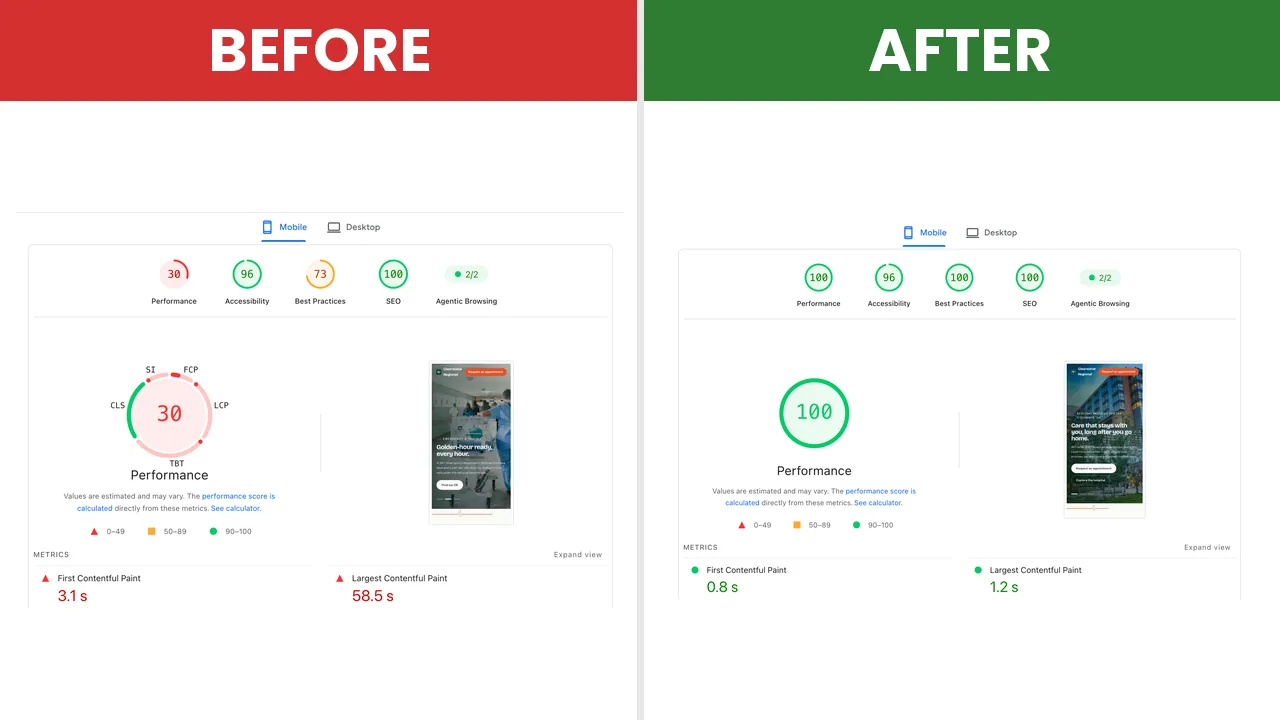
Run your website through PageSpeed Insights. Mobile tab. Write the numbers down — LCP, total page weight, score.
You will want the before.
The tutorial
Everything below lives in one place:
Each toggle applies on save. No rebuild. No deploy. Every one is reversible in one click.
Font
TAB 1 OF 5Your fonts get copied to your own domain. Two third-party round trips gone from the critical path. On mobile this alone is typically 200–400 ms faster first paint. Looks identical.
Ships only the characters your pages actually use. Usually 40–60% fewer font bytes. If your website has Hindi or another non-Latin script, open one page after saving to confirm it still renders. It should.
The browser starts downloading fonts before it has finished reading the stylesheet. Small win, free.
Font display swap is always on. Text never goes invisible while fonts load.
CSS
TAB 2 OF 5Whitespace and comments stripped. Your original files stay untouched and downloadable.
Embeds stylesheets under 15 KB into the HTML. Removes one render-blocking request on a single page. On a multi-page website it also removes CSS caching between pages, so page two loads slower. One page: on. Many pages: off.
JS
TAB 3 OF 5Scripts wait until the browser is idle or the visitor interacts. This is the biggest blocking-time win on the panel — and the one most likely to break something. After enabling, click every button, open every menu, submit every form. If something stops working, add that script's filename to the exclusion box, one per line, and it runs immediately again.
Start with Defer. It is the gentlest mode.
Copies third-party CSS and JS to your domain. Good for a jQuery or Bootstrap CDN link. Bad for anything that loads its own chunks — Google Maps, reCAPTCHA, pdf.js. Exclude those or leave it off.
Image
TAB 4 OF 5PNG, JPG and GIF converted to WebP. SVG and AVIF untouched. Anything that would get bigger keeps the original. Conversion runs on Cloudflare, not on your website, so a 20 MB photo folder is fine.
This is usually the biggest single drop in page weight. An 840 KB PNG becomes a 96 KB WebP. Same picture.
Smaller copies of your large images. A phone downloads the phone size, not the desktop size.
Below 60, photos start showing artifacts. Above 85, files get bigger for no visible gain. 80 is the number.
Put a logo or anything that must stay pixel-exact in the exclusion box — one name or keyword per line.
Lazy Load
TAB 5 OF 5Images below the fold wait until the visitor scrolls to them. Less data, faster first screen.
Same thing for embeds — maps, videos, widgets.
A YouTube iframe is around 1 MB of JavaScript before anyone presses play. This replaces it with a thumbnail and a play button. The real player loads on click. Nothing else on the panel saves more per embed.
Your largest above-the-fold image starts downloading immediately, before the browser has parsed the rest of the page. Directly improves LCP.
Adds width and height attributes to every image. Good for layout shift, but older templates with max-width: 100% and no height: auto can render squashed. Test one page before trusting it.
After
Wait a minute for the cache to rebuild. Run PageSpeed Insights again. Mobile tab. Compare with your before.
mripatna.com — a diagnostic imaging center in Patna, migrated from WordPress. The toggles above and nothing else. No code changes. No performance consultant.
If something looks wrong
Every toggle is reversible in one click. Turn it off, reload, and the website is exactly as you uploaded it. Your original files are never modified.
The two toggles that cause 90% of issues are Delay JavaScript and Self-host external CSS/JS. Both have an exclusion box. Use it before turning the whole feature off.
The short version
Ten minutes. No build step.